

Activity log
The Activity Log is a feature within the Openbeauty panel where all important actions are recorded. This allows you to easily track who performed a specific action and when it was carried out in the system.
1. What is the Activity Log?
The Activity Log is a feature within the Openbeauty panel where all important actions are recorded. This allows you to easily track who performed a specific action and when it was carried out in the system.
This feature is especially useful for administrators and business owners in terms of transparency, control, and error tracking.
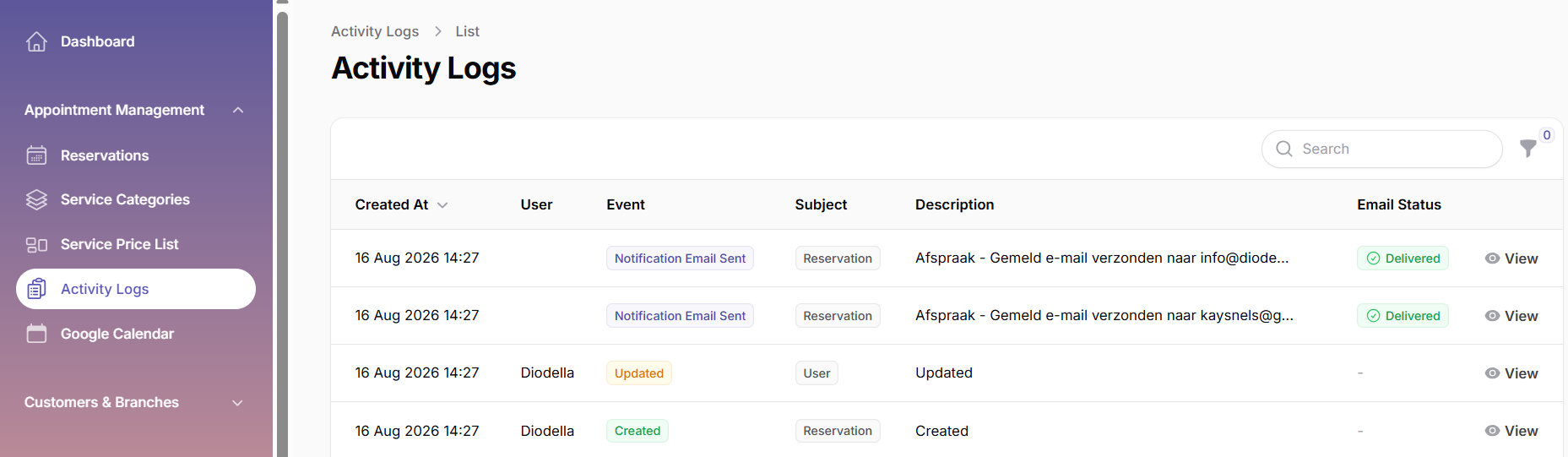
2. Which actions are shown in the Activity Log?
The Activity Log screen automatically displays many actions performed within the panel. Examples include:
- Creating an appointment
- Editing an appointment
- Cancelling an appointment
- Sending emails related to an appointment
- Creating or updating a customer
- Adding or editing a service
- System notifications
Note: The displayed actions may be expanded over time with new features.
3. Information shown on the Activity Log screen
Each row in the log displays the following information:
- Date & time: the moment the action took place
- Subject / action type: a summary of the action performed (e.g. “Appointment created”)
- Details: additional information about the action
- User (if applicable): the panel user who performed the action
Thanks to this information, all previous actions can be clearly reviewed.
4. What is the Activity Log used for?
- Reviewing past actions
- Identifying incorrect or erroneous actions
- Supporting internal team tracking and follow-up
- Serving as a reference in customer-related situations